Know every customer.Reach them the moment it counts.
DiceX Connect turns your WordPress site into a customer engine. It sorts buyers into club levels you define, catches the moments that matter — a new order, a form entry, a suspicious login — and sends the right message to the right person over WhatsApp, Telegram and the other channels in your region, with Discord coming soon. No code.
WordPress runs 4 in 10 websites. DiceX Connect makes yours work harder.
Every WordPress site already collects customers, orders and form entries. DiceX Connect puts them to work: it keeps your customers organised in DiceX and tells you — and them — what happened the moment it happens. No developer needed.
of all websites run on WordPress
40.2%
of sites with a known CMS chose WordPress
58.8%
of online stores with a known platform run WooCommerce
47.7%
GCC countries where WordPress is the leading CMS
6 of 6
WordPress in the Gulf
Share of websites with a known CMS, by country domain.
Choose the recipients and channel order for each notification card. If sending through the first channel fails, the next one is tried. SMS, voice calls and Safir send on the DiceX shared line from the start; WhatsApp, Telegram and Bale need a line activated in your DiceX panel first.
SMS
WhatsApp
Voice call
Telegram Bot
Bale Bot
Safir
Discordcoming soonIn every region: your own team's alerts in a Discord channel. Discord reaches a channel, never a phone number.
If SMS does not land, try Telegram. Then the next one.
If a send fails, the next configured route is tried. The sequence stops at the first successful send. Missing sender lines, gateway rejection and network errors count as failed attempts.
Interactive demo · sample dataTHE LIVING RELAY / 01
Recipient, region and sample outcome+
Channel order01 → 03
Drag or use the up and down buttons.
1SMS
2WhatsApp
3Telegram Bot
Discord is coming soon; not a route yet
✓ Event recordedWordPress
Sample eventSite eventEVT · 1042
SMS1
WhatsApp2
Telegram Bot3
↗
Message for Site adminReady to try
Sample event 1042 is recorded on the site and ready to review.
1. SMSNot attempted
2. WhatsAppNot attempted
3. Telegram BotNot attempted
✓ The original event remains successful.
Region is selected manually. Iran: all six channels. GCC and World Wide: WhatsApp and Telegram, SMS coming soon. Discord coming soon in every region. Online payment: Iran and GCC; World Wide through Tap coming soon. Region also affects phone validation.
Simulated results. No messages are sent. Send success does not prove receipt by a person.
03Integrations
Every event that matters, from plugins you already run
DiceX Connect listens to WordPress itself and to the plugins below. Each event gets its own card: pick who is told, what they read and which channels carry it.
WooCommerce
Notify site admins, the customer or both about new orders and status changes. Choose which statuses trigger a message. Orders are only read through WooCommerce’s own API, so it works with High-Performance Order Storage.
WooCommerce HPOS
Sample orderwoo
#1042✓ Recorded
Sample item× 1
Awaiting review✓
↗
An update for customers
Your sample order #1042 is recorded. Thank you.
↗
A heads-up for admins
Sample order #1042 is recorded and ready to review.
Sample
WPForms
Once a form is completed, notify one or more site admins, the form submitter or both. The submitter’s mobile number is found automatically among the submitted values, with no manual mapping.
WPForms selects a region-valid number from submitted values, preferring phone-like field names. This is not AI extraction.
“
A NEW CONVERSATION
Let’s work together
Name: Sara
Subject: Store collaboration
Mobile number: ••• ••• 4821Number found
Sample
Contact Form 7
Notify site admins, the form submitter or both after Contact Form 7 successfully sends its email. Invalid submissions, failed mail sends and entries caught as spam do not trigger a notification.
✕Invalid submission
✕Mail send failed
✕Caught as spam
✓Email sent
Sample
Gravity Forms
Notify site admins, the form submitter or both immediately after the entry is saved. The message uses the stored entry, rather than an unfinished form.
Saved entry#2187
Name: Sara
Subject: Store collaboration
✓ Recorded
Sample
Digits
The login and registration codes Digits generates are delivered through DiceX. The wording and the recipient stay with Digits. One step on your side: pick DiceX in Digits' own SMS gateway settings.
DigitsMessage and recipient
DiceXDelivery
Mobile number
••• ••• 4821
Sample
WordPress security events
Repeated failed logins from one address, an administrator signing in, a new user registering, a password reset. You set the failed-login threshold yourself: every attempt, 3, 5 or 10 within fifteen minutes. Built on WordPress's own hooks, so no security plugin is needed.
These are WordPress event notifications. The plugin is not a firewall and does not prevent attacks.
WordPress events
Repeated failed logins×3
Admin login
New user registered
Password reset
Sample
DiceX two-step login
Three modes: a one-time code after the password, passwordless sign-in with a mobile number alone, or both. With a countdown, a resend that moves to the next channel in the chain, and a dependable way back in through wp-config.php.
DiceX Connect
Sample two-step login code
482061
Sample · WordPress
04Customer Club
Your customers, in levels you define — and kept in DiceX.
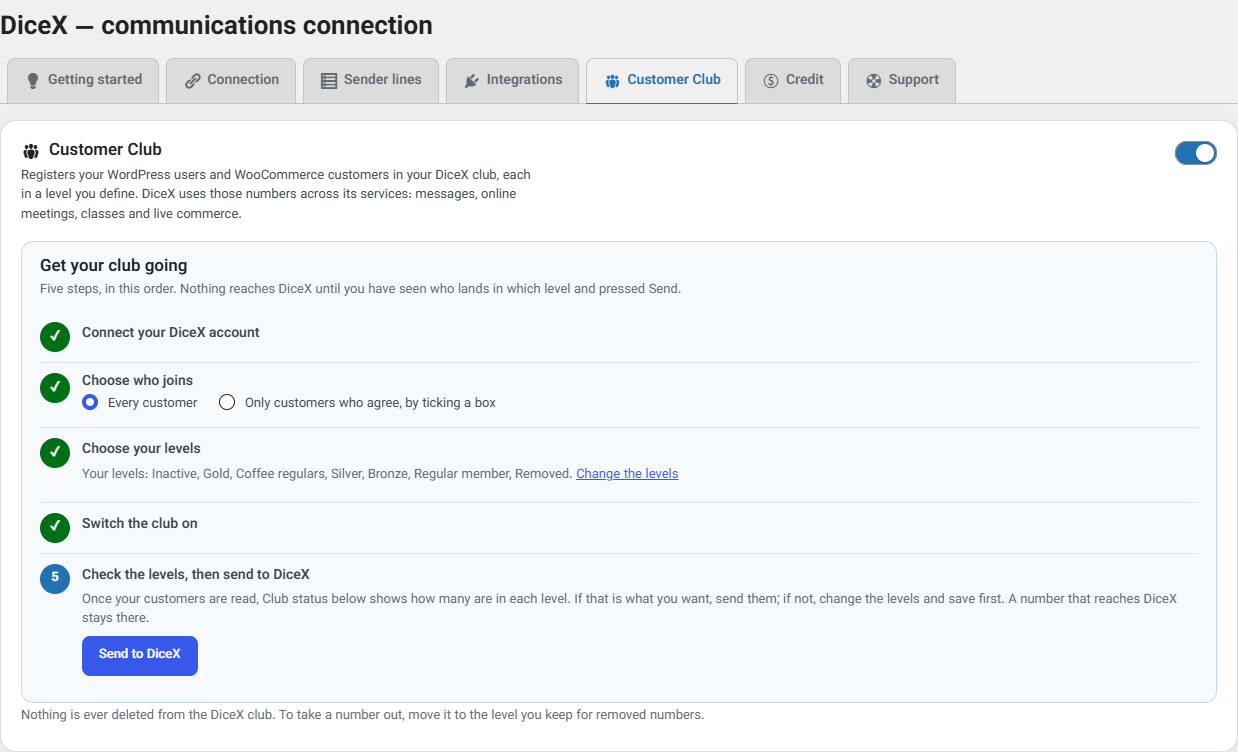
The Customer Club registers your WordPress users and WooCommerce customers in your own DiceX club and moves each one between the levels you define as they buy. DiceX then uses those contacts across its services: messages, online meetings, classes and live commerce. Five guided steps take it from switched off to running, and nothing reaches DiceX until you have checked the counts.
The Customer Club tab: five steps to a running club
A level can ask for
Amount spent
Number of orders
Days since the last purchase
Age
Product category
Product
Brand
Country
City
Levels you define
Start from the ready-made set, ranked by orders so it works in any currency — Gold at 10, Silver at 5, Bronze at 2, Inactive after 180 days without a purchase — or build your own. Each customer sits in the first level whose conditions they all meet.
Groups beside the levels
A customer is in one level but in every group they match — coffee buyers, say, or customers from one city. Up to 20 groups per club.
A welcome, and a note on moving up
A welcome the first time someone joins, never for an imported customer, and a message when they reach a higher level — over your channel chain, and on a multilingual site in the customer's own language.
Date of birth
Asked at checkout, on registration and in the account, in the Solar Hijri or the Gregorian calendar. The DiceX panel sends birthday greetings from it.
Consent and control
Everyone joins, or only those who tick the box — your choice. Anyone can leave from their own account, which moves them to your removed-numbers level. Nothing is ever deleted from the DiceX club.
In the background, even for big stores
Syncing runs in the background, never during checkout: as things happen, once a day at a time you choose, or both. Only changes are sent, and the wp dicex club command imports and syncs from the command line.
Works with WooCommerce's High-Performance Order Storage. Without WooCommerce it still registers WordPress users; the purchase conditions then have nothing to read.
05All inside your dashboard
It knows where you operate
DiceX does not sell the same services everywhere. Pick your region and the plugin offers only what is genuinely available there, instead of a button that fails when you press it.
GCC: WhatsApp and Telegram, plus online payment through Thawani; Tap card payments, SMS and Discord coming soon
Iran: all six channels, plus the local payment gateways; Discord coming soon
World Wide: WhatsApp and Telegram; card payment through Tap, SMS and Discord coming soon
Phone numbers take the shape that region expects
Nothing about the region is sent to DiceX
Available in this region
GCCGulf countriesOnline payment
SMS coming soonDiscord coming soon
IRIranOnline payment
Discord coming soon
WWWorld WideTap payment coming soon
SMS coming soonDiscord coming soon
Region is selected manually. Iran: all six channels. GCC and World Wide: WhatsApp and Telegram, SMS coming soon. Discord coming soon in every region. Online payment: Iran and GCC; World Wide through Tap coming soon. Region also affects phone validation.
Admins, customers or both. Your choice.
Choose recipients separately for each card: one or more site admins, the customer or form submitter, or a combination. Enter admin phone numbers or select WordPress administrators with a mobile number in their profile.
Site adminCustomer
Message template
{site_name} · Hello {customer_name}, order {order_number}: {order_status}
Conceptual settings view · not a product screenshot
An admin that speaks your language
The screens follow the language of whoever is signed in to WordPress — there is nothing to set. The layout changes direction to match.
سلام، به دایساکس خوش آمدید.Hello. Welcome to DiceX.
Translations arrive from translate.wordpress.org, with no update needed
Real right-to-left layout, not just translated strings
Your own name at the start of every message
A log of the last 50 sends, with destination numbers masked
A Support tab to write to DiceX without leaving WordPress
Credit and payment, inside the dashboard
See what your DiceX account has left and top it up without leaving WordPress.
Tapcoming soonThawaniDigipaySamanSepehr
Live account balance
Top up from the dashboard in Iran with Saman, Sepehr or Digipay: a preset amount or any amount you type
Gulf and World Wide: paying from the dashboard through Thawani and Tap is coming soon. In the Gulf you can already pay with Thawani on our buy page
Discount coupons are applied in your DiceX panel, not from WordPress
A seven-day, no-questions-asked money-back guarantee covers every digital service bought through the international gateways.
DiceX Connect runs on prepaid service credit. You buy credit in advance and spend it as your site sends. There is no monthly fee, and the plugin itself is free.
What a message costs depends on
The channel it goes out on
Where it is going, and which operator carries it
For SMS, how many parts the message splits into
DiceX works the cost out at the moment of sending and takes it from your balance.
Each message template counts its own SMS parts as you write it, so you can see what a message will be billed as before you save it.
Your balance is on the Credit tab, and you can top up without leaving WordPress.
A discount coupon is applied in the DiceX panel, not from WordPress.
Message counts are worked out from today's rates and rounded down. SMS is not counted here: its price depends on the destination country and the operator, so it varies.
The smallest top-up is 5 OMR. You can also enter any other amount in the plugin's Credit tab.
What a message costs today
Telegram Bot
$0.0045per message
WhatsApp
$0.0047per message
SMS
Floating. The price depends on the destination country and the operator that carries the message.
Prices are set by DiceX and can change. Whatever a message costs is taken from the credit you bought in advance.
The plugin is free and open source under the GPL. You pay only for the messages you send.Account panel
07Getting started
From installation to your first test
1
Install the plugin
In your WordPress dashboard go to Plugins → Add New, search for DiceX Connect, then install and activate it.
Switch on the cards for the supported plugins and WordPress events you need. Set the recipients, message, channels and sender line, then send a test message.
Free and open source. Connect your DiceX account, switch on the Customer Club and the events you care about, and let every customer hear from you on the channel they read.
The plugin is free. Sending uses your DiceX account credit. Create a DiceX account and your API key. Enter the key in the plugin’s Connection tab.
What does it cost?
The plugin is free. Sending runs on prepaid credit in your DiceX account: you top up in advance, and each message costs according to its channel, its destination and the operator carrying it, and for SMS the number of parts it splits into. DiceX works that out as the message goes and takes it from your balance. There is no subscription.
What does the Customer Club do?
It registers your WordPress users and WooCommerce customers in your own DiceX club, places each one in the levels and groups you define, and keeps that current as they buy. It gives no points or coupons; DiceX uses those contacts across its messages, meetings, classes and live commerce.
Are notifications only sent to customers?
No. Each notification card can notify one or more site admins, the customer or form submitter, or a combination. You choose recipients in that card’s settings. For example, admins can receive security alerts while customers receive order updates.
Which plugins can trigger a message?
WooCommerce, WPForms, Contact Form 7, Gravity Forms and Digits when installed on your site. DiceX Connect also handles WordPress’s own login and registration events, which need no additional plugin.
Does it send to Discord?
Not yet. Discord is coming soon in every region, for your own team's alerts — a new order, a form entry, a login — posted in a Discord channel. Discord reaches a channel or a Discord account, never a phone number, so it is not a way to message customers.
Will a failed message break my checkout or my forms?
No. A send that fails is recorded in the plugin's log and nothing else happens. The order is still placed and the form is still submitted.
Does it work with WooCommerce High-Performance Order Storage?
Yes. Orders are only ever read through WooCommerce's own API, and the plugin declares HPOS compatibility.
How does it find the phone number on a form?
It reads the submitted values and picks the one that is a usable mobile number for your region. A field labelled like a phone field wins over any other. There is nothing to map.
Can I write the messages myself?
Yes. Every card has its own message, which you build from tags such as the order number, the status, the customer's name and your site name.
What leaves my site?
Sending a message: the API key, the recipient's number, the message and the sender line. With the Customer Club on: each member's number, name, level and groups, the date of their first purchase and, if you choose, date of birth, email, company and address. The Support tab, only when an administrator presses Send: an email to DiceX support with the site's details and, unless unticked, the plugin's log; the API key is never included. The plugin has no tracking, analytics or telemetry.
How do I get help?
From the Support tab in the plugin, after Credit. Write your email, a subject and a message; it goes to DiceX support through your site's own mail, with the site details the tab lists before you send and, unless you untick it, the plugin's log. The answer comes to the address you give.
What languages does it come in?
English and Persian are bundled, and every string is translatable. The screens follow the language of the signed-in user, and you can pin them if you would rather.








 DiceXDelivery
 Tapcoming soon
 Thawani
 Digipay
 Saman
Saman Sepehr